Case study · Support tool · February 2026
AHTracker
Handling time, live, while it can still change.
AHTracker is a handling-time tracker for customer support agents who work email, phone and chat. It times each case as it happens and shows the agent their averages live, instead of after the shift. I spotted the gap from inside a fintech support desk, then designed the tool and built it with Base44. Version 1.0 passed App Store review on 16 April 2026.
- What I owned
- All of it, on my own: I spotted the gap on a fintech support desk, designed the tool, built it with Base44 and shipped it through App Store review.
- What changed because of me
- It turns handling time from an after-the-shift number into a live one. Each case is timed as it happens, with averages split by email, phone and chat while there is still time to change them.
- By how much
- No usage numbers, by design: case data never leaves the agent’s browser, so there is nothing central to count. Measuring the effect, with each agent’s consent, is the next step.
- Role
- Solo. Spotted the problem, designed it, built it with Base44 and shipped it.
- When
- Built from February 2026, the month I started on Base44. Through App Store review on 16 April 2026.
- For
- Support agents working email, phone and chat.
- Tools
- Base44. No login, no server-side data.
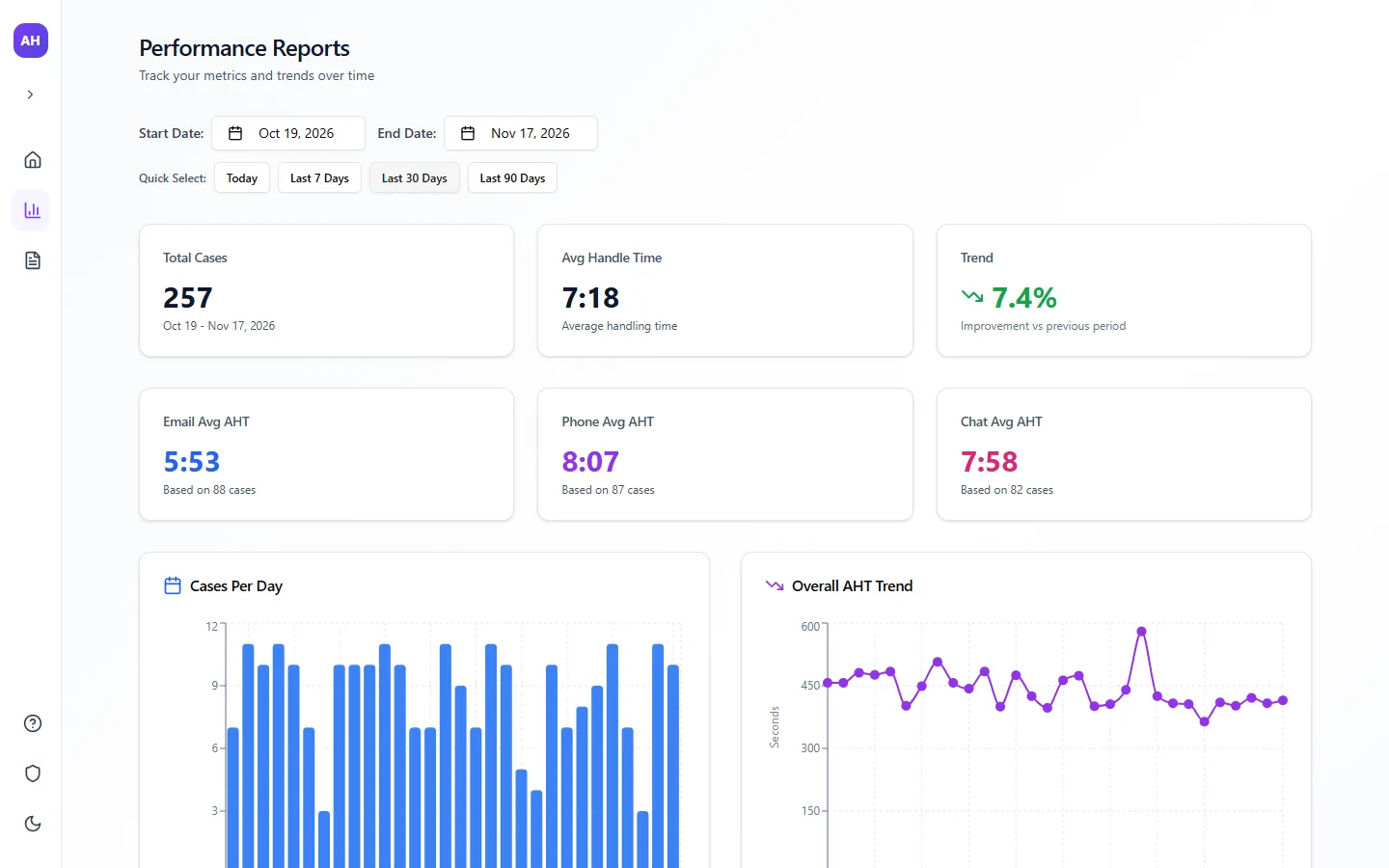
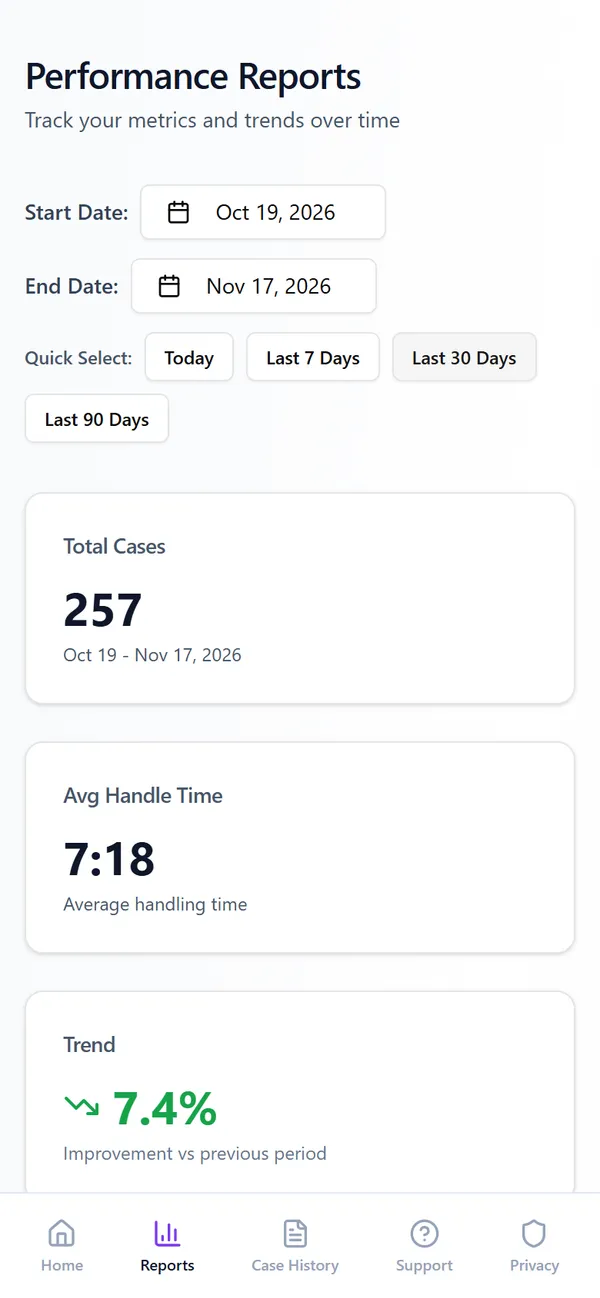
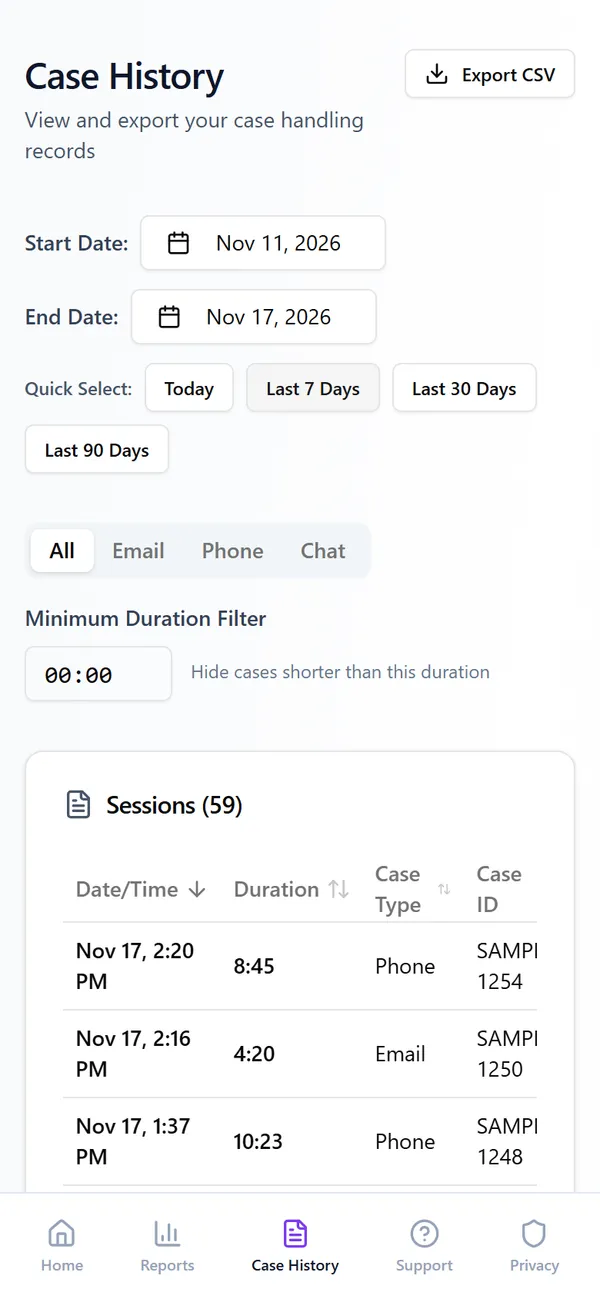
Performance reports, shown with sample cases generated for this page. Real case data never leaves the agent’s browser.
The problem
Agents found out how they did when it was too late to change it.
Support agents are measured on average handle time across email, phone and chat. On the desk I worked on there was no easy way to see it in real time. You found out how you were doing after the fact, when it was too late to adjust.
I wanted every agent to see the number live, case by case, while there was still time to act on it.
Role and constraints
A tool an agent can open and use mid-shift.
I spotted the problem as an agent on the desk, then designed the tool and built it with Base44.
- 01No loginIt opens and works. Nothing to sign up for and nothing to request.
- 02Nothing leaves the browserEvery case is stored in the agent’s own browser, never on a server, and deleted after 30 days. Case IDs and contact reasons stay with the agent.
- 03Three channelsEmail, phone and chat each get their own average and their own trend.
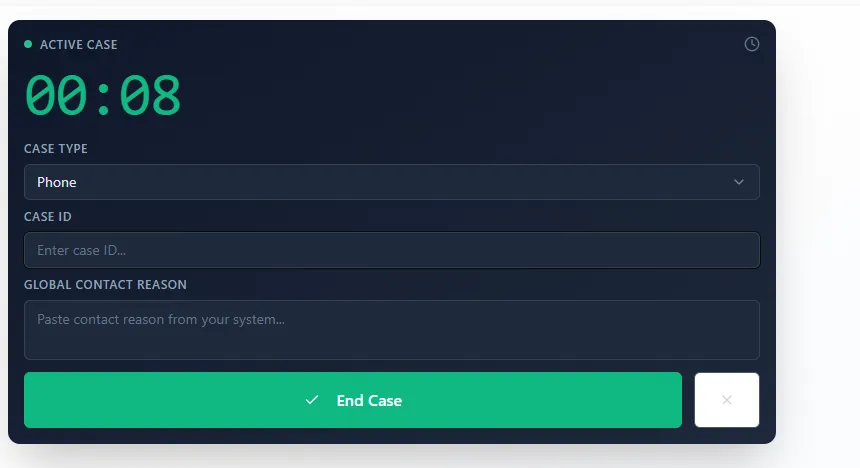
- 04Low frictionBuilt for fast use between cases: start the timer, pick the channel, end the case.
Process
The number that matters first, and an obvious next step.
That line was the brief for every screen. Home leads with today’s case count and live averages for each channel, then one large button to start a case.
Ending a case takes two clicks on purpose. The first checks the required fields. The second confirms, so a stray click never ends a case by accident. If the page reloads mid-case, the timer carries on where it was.
Key decisions
Small tool, deliberate choices.
Decision 01
Keep the data with the agent.
Every case stays in the agent’s own browser and is deleted after 30 days. Nothing goes to a server, and the reports and history pages say so in plain words at the bottom.
The agent owns the record, and the tool works without anyone else’s permission or setup.
Decision 02
Split every average by channel.
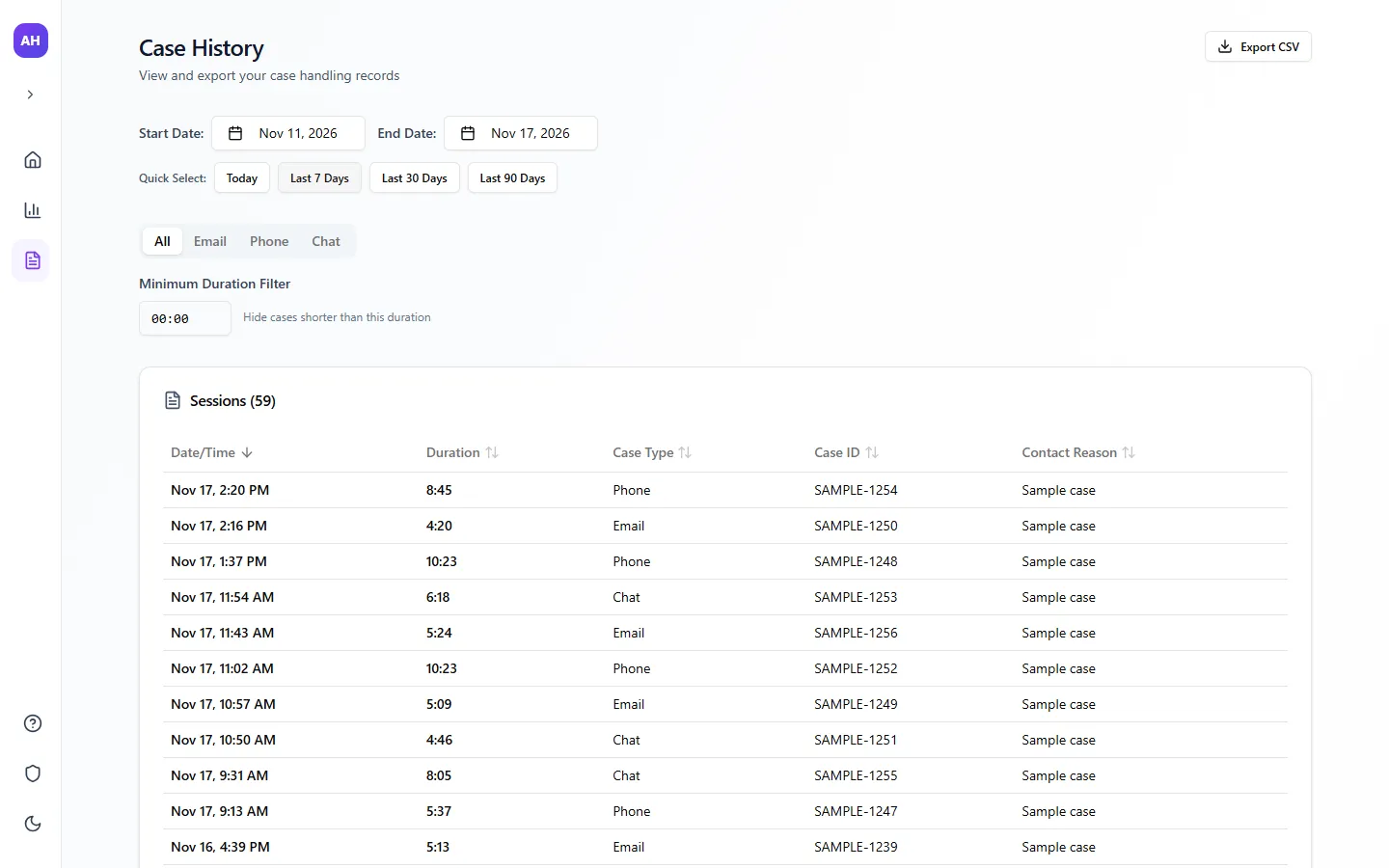
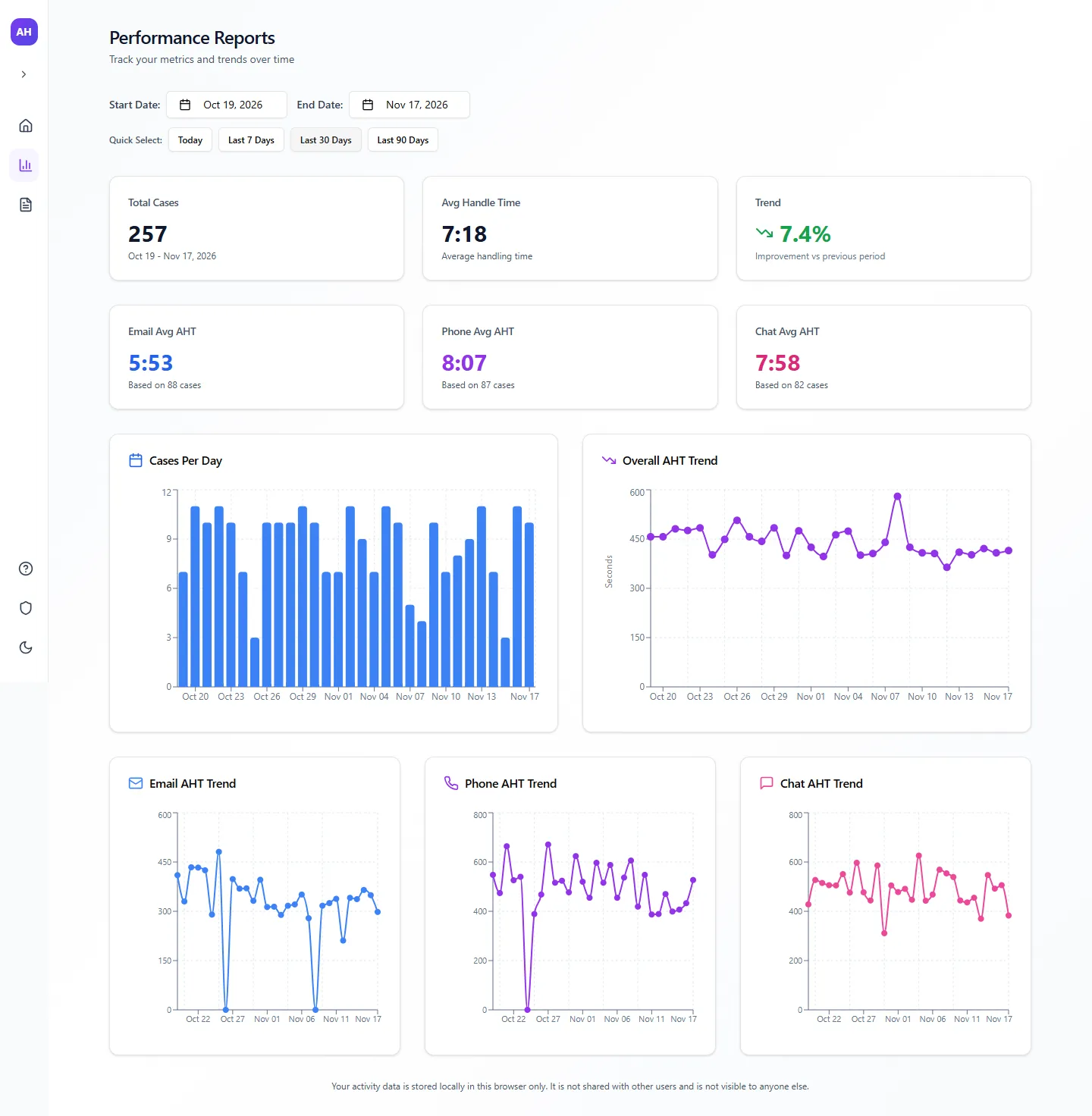
An export from early February has no case type column. By March every case carried its channel, and the averages, the trends and the history all split into email, phone and chat.
Decision 03
Compare, do not just count.
Reports compare any date range with the period before it, so an agent can see whether they are getting faster, not only how fast they are.
What shipped
A dashboard, a timer, reports and a history.
A live dashboard with today’s cases and averages for each channel, a case timer that survives a reload, performance reports for any range with a trend against the previous period, and a case history with filters and CSV export. Dark mode, no login, free.
Results
Designed, built and shipped.
Version 1.0 passed App Store review on 16 April 2026, and the web version is live and free. There are no usage numbers to show, by design: the data never leaves each agent’s browser.
What I would do next
- 01Decide whether the knowledge base, reply templates and AI reply drafter already in the code belong in this product or in their own.
- 02Measure the effect: compare an agent’s handle time before and after they start seeing it live, with their consent.